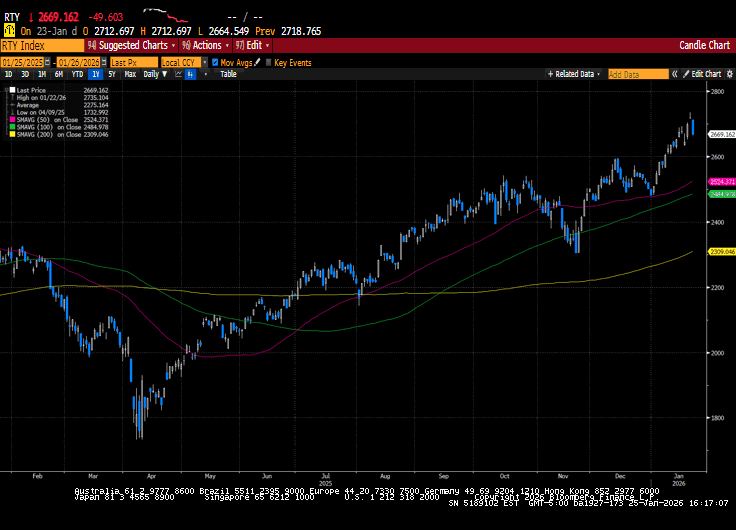
Global equity markets finished the week mixed, with US markets posting their second straight week of losses. Geopolitical concerns and trade tensions were top of mind for investors as global leaders met in Davos at the World Economic Forum. President Trump’s sharp...
If you take even one regular medication, Medicare prescription drug coverage can make a meaningful difference in your monthly budget. But Part D can also feel confusing because plans change, formularies change, and costs can vary widely from one person to the...
When people think about “financial planning,” they often picture investing—choosing funds, watching the market, or trying to pick the right time to buy. But a truly well-rounded financial plan is bigger than a portfolio. A strong plan examines your total financial...
By Sarah Brenner, JD Director of Retirement Education Question: Hello! I have been a big fan for a long time. I have a question regarding a Roth IRA I inherited from my younger brother last year. I have heard that I must empty this account by the end of 2035. I...
By Sarah Brenner, JD Director of Retirement Education IRA and Roth IRA contributions are only permitted when you have taxable “compensation” or earned income. Typically, whether or not a person has compensation is a relatively straightforward determination. For...
Note that the example above uses jQuery to trigger the function call, but you could trigger the function call using any method you wish.fbq('track', 'Lead'); - To track the lead event on the page. Like Thank you page after submitting the lead.
If you have the Thank you page after submitting the lead then you can paste this code on the page and it'll track it as a successful lead.
If instead you wanted to track a standard purchase event when the visitor clicks a purchase button, you could tie the fbq('track') function call to the lead button on your page, like this: