Retirement is no longer viewed as simply “stopping work.” For many individuals and families, retirement is about creating freedom, protecting the lifestyle they’ve worked hard to build, and gaining peace of mind for the future. With rising healthcare costs, market...
By Ian Berger, JD IRA Analyst Most of you are probably familiar with the concept of the “required beginning date” (RBD). The RBD is the deadline for taking the first required minimum distribution (RMD) from an IRA or workplace retirement plan. If you’re a traditional...
By Sarah Brenner, JD Director of Retirement Education On April 30, 2026, President Trump signed an executive order to promote retirement savings for American workers. In its aftermath, we have had a flurry of questions about a new savings option called a “Trump...
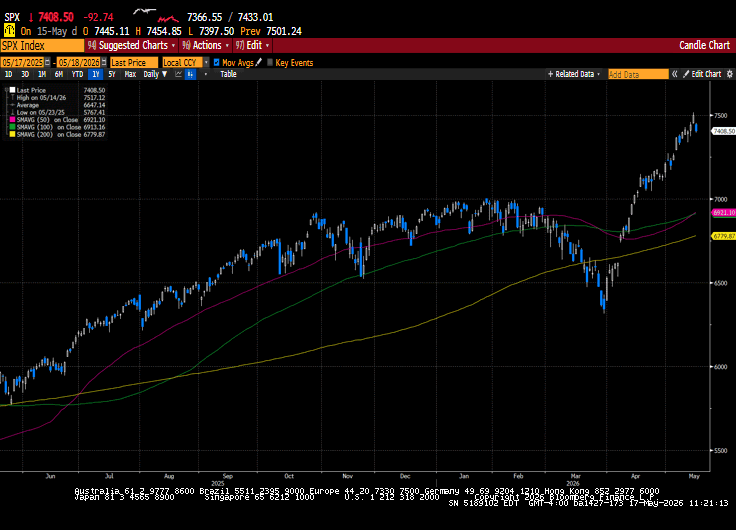
US equity markets finished the week mixed in volatile trade. Hotter-than-expected inflation data, coupled with increased tensions in the Middle East, sent US Treasury yields significantly higher. The US-China summit ended with both sides with no real incremental...
Medicare continues to evolve each year, and 2026 is bringing several important updates that could directly impact prescription drug costs, coverage choices, and overall healthcare planning for Medicare beneficiaries. One of the biggest areas of focus this year is...
Note that the example above uses jQuery to trigger the function call, but you could trigger the function call using any method you wish.fbq('track', 'Lead'); - To track the lead event on the page. Like Thank you page after submitting the lead.
If you have the Thank you page after submitting the lead then you can paste this code on the page and it'll track it as a successful lead.
If instead you wanted to track a standard purchase event when the visitor clicks a purchase button, you could tie the fbq('track') function call to the lead button on your page, like this: