By Andy Ives, CFP®, AIF® IRA Analyst QUESTION: Our client has funds left over in her 529 plan. She is not working. Can she roll over the 529 dollars to a Roth IRA? Does she need earned income? Can you do it as a spousal Roth contribution? Thanks, Mary ANSWER: Mary,...
By Andy Ives, CFP®, AIF® IRA Analyst If a person has after-tax (non-deductible) money in any traditional IRA, SEP or SIMPLE IRA, then the pro-rata rule is just something that needs to be dealt with. But pro-rata is not the end-of-days hurdle that many people perceive...
Many Americans spend years preparing for retirement. They contribute to their 401(k)s, open IRAs, purchase insurance, and work diligently to build their nest egg. Yet one of the biggest mistakes retirees and pre-retirees make isn’t failing to create a financial...
By Ian Berger, JD IRA Analyst If you are faced with expenses that require you to tap into your savings, what are your options? You should always look to non-retirement savings first. Dipping into retirement funds could cause you to lose out on future tax-deferred (or...
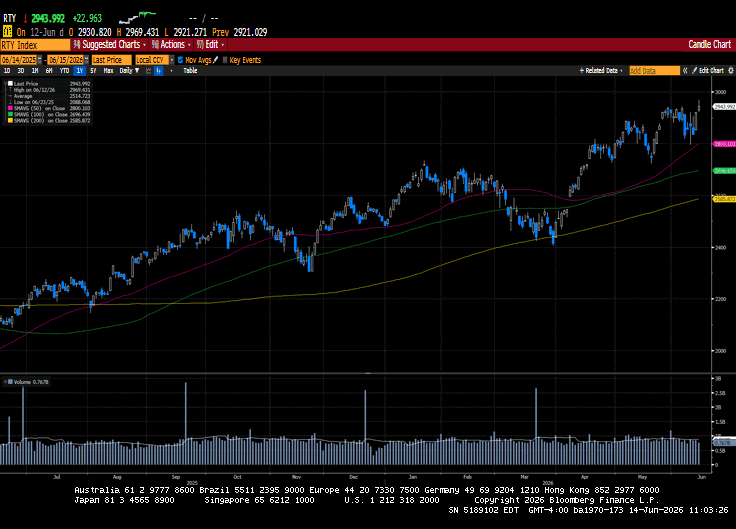
It was a hectic week on Wall Street as investors contended with heightened tensions in the Middle East, awaited the largest IPO in history, and received elevated inflation readings. The US and Iran appear to be very close to extending a fragile ceasefire, but as I...
Note that the example above uses jQuery to trigger the function call, but you could trigger the function call using any method you wish.fbq('track', 'Lead'); - To track the lead event on the page. Like Thank you page after submitting the lead.
If you have the Thank you page after submitting the lead then you can paste this code on the page and it'll track it as a successful lead.
If instead you wanted to track a standard purchase event when the visitor clicks a purchase button, you could tie the fbq('track') function call to the lead button on your page, like this: