By Sarah Brenner, JD Director of Retirement Education Question: Can required minimum distributions (RMDs) from 403(b) plans be aggregated and taken from one account? Answer: Yes, it is allowed to aggregate RMDs from multiple 403(b) plans and take the total from one of...
By Ian Berger, JD IRA Analyst The June 15, 2026 Slott Report described the strict barriers employees face when attempting to access their 401(k) and other plan funds while still working. One exception to those barriers is for hardship withdrawals. Plans are not...
By Sarah Brenner, JD Director of Retirement Education On July 4, contributions to Trump accounts, a new savings vehicle for children, will become available. In these final days before their launch, we have been getting questions from parents about exactly what they...
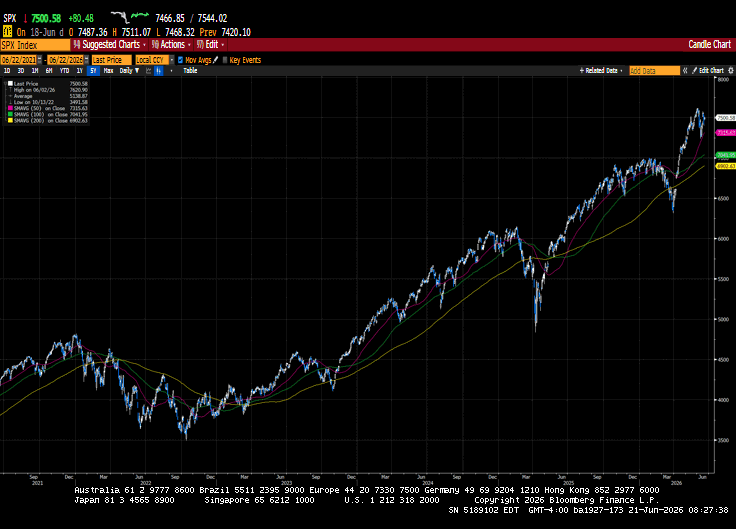
Happy Father’s Day to all the fathers out there. The holiday-shortened week brought gains to US equities and saw the Japanese and South Korean markets forge new all-time highs. The signing of a memorandum of understanding between the US and Iran extended the...
For many Americans, turning 65 feels like a major milestone. While Medicare enrollment is often the first thing people think about, the reality is that Medicare is just one piece of a much larger retirement puzzle. Decisions made during this period can have a lasting...
Note that the example above uses jQuery to trigger the function call, but you could trigger the function call using any method you wish.fbq('track', 'Lead'); - To track the lead event on the page. Like Thank you page after submitting the lead.
If you have the Thank you page after submitting the lead then you can paste this code on the page and it'll track it as a successful lead.
If instead you wanted to track a standard purchase event when the visitor clicks a purchase button, you could tie the fbq('track') function call to the lead button on your page, like this: