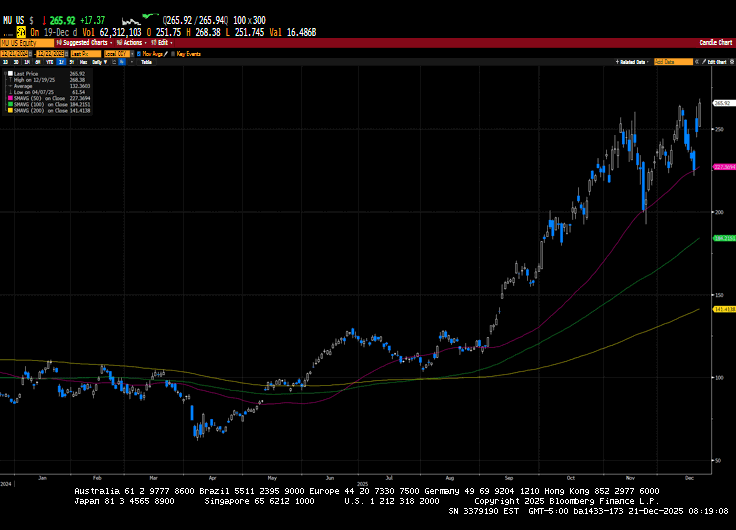
US markets finished the week mixed, with a late-week rally in technology mitigating early-week losses. Micron Technology’s third-quarter results were excellent and helped propel technology stocks after the announcement. Western Digital, Seagate, and Sandisk, other...
2026 is shaping up to be one of the most “noticeably different” Medicare years in a while—not because the rules are unrecognizable, but because the cost and prescription-drug pieces are moving in ways that many beneficiaries will actually feel in their monthly budget....
As we move into 2026, many retirees and pre-retirees are asking the same question: “How do I keep my retirement plan growing without exposing everything to the next market swing?” After several years of elevated volatility and changing interest-rate conditions, more...
By Sarah Brenner, JD Director of Retirement Education Question: If a grandchild, age 30, inherits IRA assets from her grandparent, age 92, and has to take required minimum distributions (RMDs) from the inherited IRA, can she send those RMDs directly to charity...
By Andy Ives, CFP®, AIF® IRA Analyst In a scene from “The Simpsons,” daughter Lisa announces she has become a vegetarian. Homer asks some probing questions. “Are you saying you’re never going to eat any animal again? What about bacon? Ham? Pork chops?” When...
Note that the example above uses jQuery to trigger the function call, but you could trigger the function call using any method you wish.fbq('track', 'Lead'); - To track the lead event on the page. Like Thank you page after submitting the lead.
If you have the Thank you page after submitting the lead then you can paste this code on the page and it'll track it as a successful lead.
If instead you wanted to track a standard purchase event when the visitor clicks a purchase button, you could tie the fbq('track') function call to the lead button on your page, like this: