When the Centers for Medicare & Medicaid Services (CMS) pays Medicare Advantage (MA) organizations, they increase the payments when plans enroll sicker people. This is called risk adjustment, and it is an important guardrail to ensure that all people with Medicare...
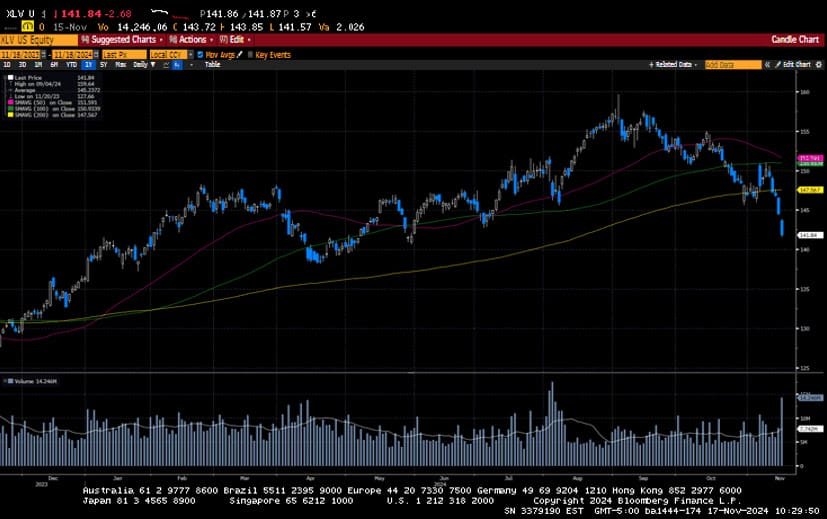
-Darren Leavitt, CFA US equity markets pulled back last week as investors took profits from the outsized move higher seen following the US election. Sticky inflation prints, coupled with solid retail sales and hawkish comments from Federal Reserve Chairman J. Powell,...
Downsizing for retirement is a good way to simplify your life and cut down on expenses. Making some key changes, like moving into a smaller home, could reduce financial strain and improve your quality of life. It could also give you room to grow in new, unexpected...
By Andy Ives, CFP®, AIF® IRA Analyst Roth IRA conversions remain as popular as ever. However, based on some recent questions we’ve received, it is apparent that folks don’t fully understand all the nuances of this transaction. Here are some of the basic...
By Ian Berger, JD IRA Analyst The get-out-of-jail card that has allowed many IRA and plan beneficiaries to forego annual required minimum distributions (RMDs) is about to expire. Here’s some background: In its 2022 proposed regulations, the IRS took the...
Note that the example above uses jQuery to trigger the function call, but you could trigger the function call using any method you wish.fbq('track', 'Lead'); - To track the lead event on the page. Like Thank you page after submitting the lead.
If you have the Thank you page after submitting the lead then you can paste this code on the page and it'll track it as a successful lead.
If instead you wanted to track a standard purchase event when the visitor clicks a purchase button, you could tie the fbq('track') function call to the lead button on your page, like this: