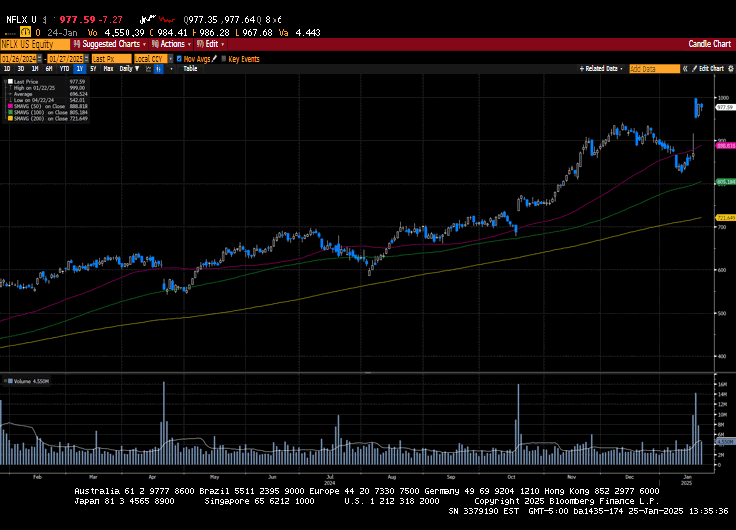
Darren Leavitt, CFA Wow, what a week! US markets were closed on Monday for Martin Luther King Jr. Day, and Donald Trump was inaugurated as the 47th President of the United States. It was a historic day indeed. The global markets were poised for a barrage of executive...
Two important changes are coming for Medicare Part D beneficiaries in 2025 as a result of the Inflation Reduction Act: Annual out-of-pocket (OOP) cap of $2,000 for prescription drugs. Medicare Prescription Payment Plan (MPPP), which will allow beneficiaries who opt in...
Our checklist for retiring next year includes everything you need to do before the retirement party. Only you can know if you’re ready for a checklist for retiring in 2025. If you’re 60 or getting there, retirement is no longer a hazy concept in the distance....
By Sarah Brenner, JD Director of Retirement Education Question: I have a large non-qualified 457 deferred compensation plan and I am required to take distributions. I am looking to minimize taxes. Can I roll over these funds to an IRA? Answer: Unfortunately,...
By Andy Ives, CFP®, AIF® IRA Analyst When the “check engine” light comes on in a vehicle, most people are rightfully concerned that something is wrong. When a fire alarm blares through a building, it is wise to take stock of your surroundings. And when a member...
Note that the example above uses jQuery to trigger the function call, but you could trigger the function call using any method you wish.fbq('track', 'Lead'); - To track the lead event on the page. Like Thank you page after submitting the lead.
If you have the Thank you page after submitting the lead then you can paste this code on the page and it'll track it as a successful lead.
If instead you wanted to track a standard purchase event when the visitor clicks a purchase button, you could tie the fbq('track') function call to the lead button on your page, like this: