By Ian Berger, JD IRA Analyst Recent IRS guidance confirms that any employer that wishes to make employer contributions to Trump accounts must comply with several administrative requirements. Especially for small employers, these requirements are likely to be...
When most people think about Medicare, they think about coverage for doctor visits, hospital stays, prescriptions, and medical treatment. But Medicare also provides access to a wide range of preventive services designed to help beneficiaries stay healthier and...
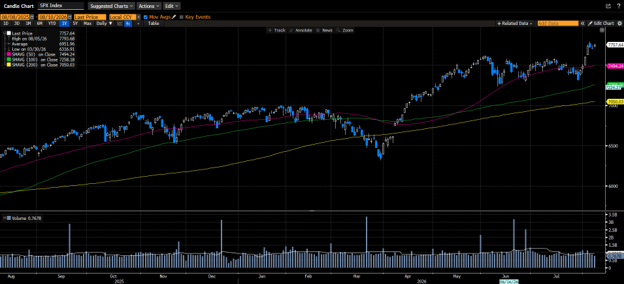
The S&P 500 forged a new all-time high as investors recalibrated interest-rate-hike expectations after an in-line print of the Consumer Price Index and a cooler-than-expected print of the Producer Price Index. The probability of a rate hike in September fell to...
Artificial intelligence is changing nearly every industry, and financial services are no exception. Today, consumers have access to sophisticated calculators, retirement projections, investment research, budgeting applications, and AI-powered tools that can provide...
By Ian Berger, JD IRA Analyst QUESTION: Does each conversion from a traditional IRA to a Roth IRA require a five-year holding period? I have made several conversions and know that taxes are due when conversions are done. But how long must each conversion remain in the...
Note that the example above uses jQuery to trigger the function call, but you could trigger the function call using any method you wish.fbq('track', 'Lead'); - To track the lead event on the page. Like Thank you page after submitting the lead.
If you have the Thank you page after submitting the lead then you can paste this code on the page and it'll track it as a successful lead.
If instead you wanted to track a standard purchase event when the visitor clicks a purchase button, you could tie the fbq('track') function call to the lead button on your page, like this: