By Andy Ives, CFP®, AIF® IRA Analyst QUESTION: I am age 75 and have just one IRA. I normally do multiple qualified charitable distributions (QCDs) during the year. I also make one or more partial Roth conversions during the year. Please confirm or correct my...
Retirement planning changes once the paychecks stop. In your working years, the goal is usually growth. In retirement, the goal becomes reliable income, tax efficiency, and protecting your lifestyle—all while navigating market ups and downs. If you’re retired (or...
By Ian Berger, JD IRA Analyst With all the tax changes made by the 2025 One Big Beautiful Bill Act (OBBBA), it’s no surprise that the IRS has made significant changes to the 2025 Form 1040 and supporting schedules and forms. Near the beginning of each year’s 1040...
By Sarah Brenner, JD Director of Retirement Education Everyone has heard the horror stories of how unneeded and unwanted trusts disrupted what should have been a smooth transition of wealth. However, it is important to recognize that estate planning for IRAs is...
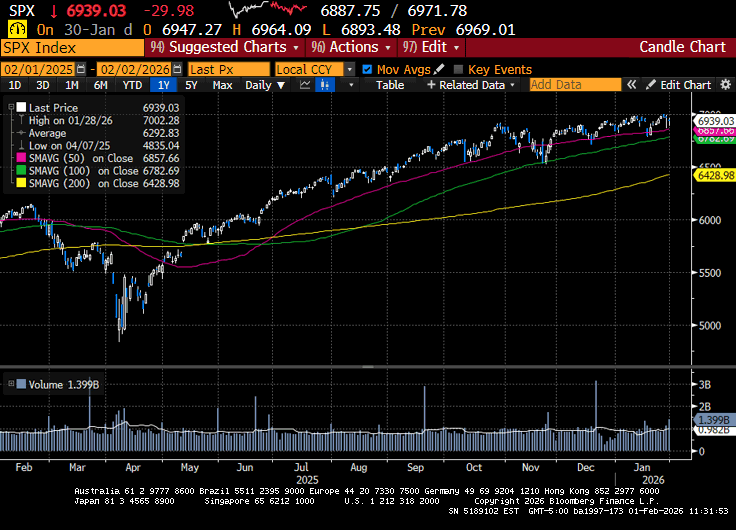
Markets ended the week mixed. With just over a third of the S&P 500 having reported fourth-quarter earnings, this earnings season appears much better than anticipated. That said, despite better-than-expected results, many companies have sold off after the...
Note that the example above uses jQuery to trigger the function call, but you could trigger the function call using any method you wish.fbq('track', 'Lead'); - To track the lead event on the page. Like Thank you page after submitting the lead.
If you have the Thank you page after submitting the lead then you can paste this code on the page and it'll track it as a successful lead.
If instead you wanted to track a standard purchase event when the visitor clicks a purchase button, you could tie the fbq('track') function call to the lead button on your page, like this: