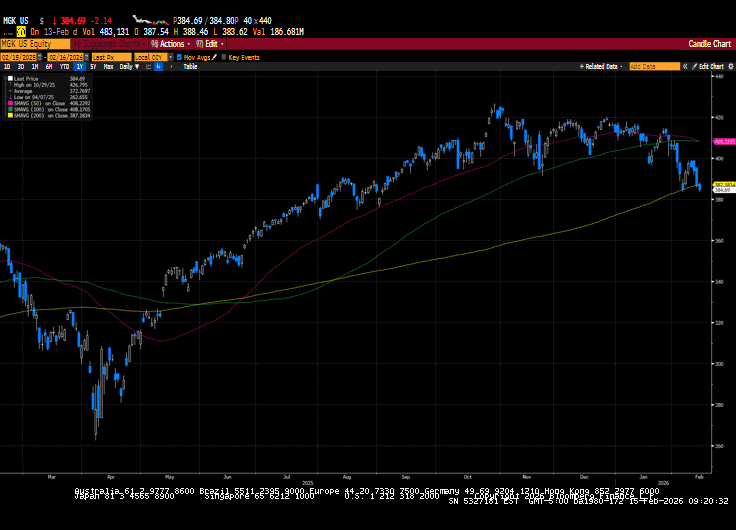
US financial markets regressed in choppy trade. The narrative around the disruptive nature of AI continued to impact markets. Rotation away from growth and mega-cap issues continued while proceeds flowed to defensive sectors and small caps. Interest rate-sensitive...
Medicare can feel straightforward at first—Part A helps cover hospital care, Part B helps cover doctor and outpatient services—but then you hear about Medicare Advantage and everything gets a little more confusing. Medicare Advantage (also called Part C) is an...
When you think about building a strong retirement plan, most people focus on a mix of stocks, bonds, and cash. But for many retirees and pre-retirees, there’s another tool that can add stability, predictability, and confidence: annuities. Annuities aren’t...
By Sarah Brenner, JD Director of Retirement Education Question: Please explain the rules and qualifications for rolling over a portion of an IRA to a Health Savings Account (HSA). Thank you, Bill Answer: Hi Bill, A Qualified HSA Funding Distribution (QHFD) is...
By Sarah Brenner, JD Director of Retirement Education If you are age 73 or older in 2026, you will need to take a required minimum distribution (RMD) from your IRA. Usually, an RMD is calculated using the IRS Uniform Lifetime Table. However, if you are married...
Note that the example above uses jQuery to trigger the function call, but you could trigger the function call using any method you wish.fbq('track', 'Lead'); - To track the lead event on the page. Like Thank you page after submitting the lead.
If you have the Thank you page after submitting the lead then you can paste this code on the page and it'll track it as a successful lead.
If instead you wanted to track a standard purchase event when the visitor clicks a purchase button, you could tie the fbq('track') function call to the lead button on your page, like this: