By Andy Ives, CFP®, AIF® IRA Analyst In our Slott Report entry from March 2 (“Fatal Error: Mistakes That Cannot Be Fixed – Part 1,”) we discussed three irreversible mistakes and the negative consequences of each. Despite any repercussions, certain IRA and...
By Ian Berger, JD IRA Analyst If you made excess deferrals to your 401(k) or 403(b) plan(s) in 2025, you need to correct the error while there’s still time. The deadline is April 15, 2026. If you don’t act before then, you’ll be double-taxed on the excess deferrals....
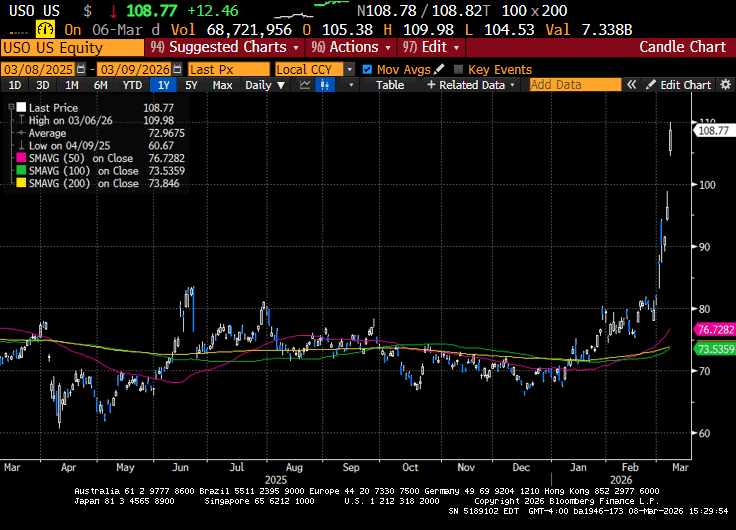
Investors endured a difficult week as the conflict between the US, Israel, and Iran continued. Iran’s efforts to target US military bases in the region broaden the conflict across the Middle East. Energy shipments through the Strait of Hormuz have come to a...
For many Americans, retirement brings freedom, flexibility, and the opportunity to enjoy the next chapter of life. But before leaving an employer health plan behind, it’s important to understand how Medicare works alongside retirement planning. Healthcare is one of...
By Sarah Brenner, JD Director of Retirement Education Question: Is it wise to designate a grandchild as primary beneficiary for IRA accounts? Answer: You can choose to name whomever you want as your IRA beneficiary. If you want your IRA funds to go to your...
Note that the example above uses jQuery to trigger the function call, but you could trigger the function call using any method you wish.fbq('track', 'Lead'); - To track the lead event on the page. Like Thank you page after submitting the lead.
If you have the Thank you page after submitting the lead then you can paste this code on the page and it'll track it as a successful lead.
If instead you wanted to track a standard purchase event when the visitor clicks a purchase button, you could tie the fbq('track') function call to the lead button on your page, like this: