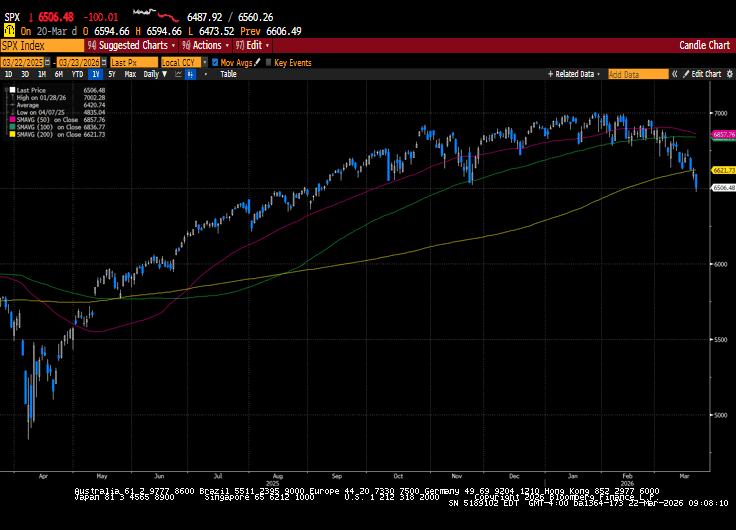
US markets fell for a third consecutive week as investors continued to assess the implications of the Iran conflict. Headlines related to Iran continued to dominate market attention. Energy markets traded higher as the military’s focus shifted to energy...
For many people, Medicare is one of the most important financial and healthcare decisions they will make in retirement. Yet it is also one of the most misunderstood. Between enrollment deadlines, coverage options, prescription plans, and out-of-pocket costs, it is...
By Andy Ives, CFP®, AIF® IRA Analyst QUESTION: I’m age 72 and my wife is age 63. I want to open a spousal Roth IRA. I already have a Roth for myself that I’ve owned for more than 5 years. Would she have to wait 5 years before she can make a withdrawal without a...
When people think about financial planning, they often focus on investments, retirement accounts, and growing wealth. When they think about insurance, they usually think about protecting their home, health, or family. The truth is, these two areas should never be...
By Ian Berger, JD IRA Analyst A few Saturdays ago, many of us moved our clocks one hour ahead to usher in Daylight Saving Time. Adjusting our clocks is a reminder to review the confusing rules surrounding the Roth IRA distribution clocks. It’s no surprise that...
Note that the example above uses jQuery to trigger the function call, but you could trigger the function call using any method you wish.fbq('track', 'Lead'); - To track the lead event on the page. Like Thank you page after submitting the lead.
If you have the Thank you page after submitting the lead then you can paste this code on the page and it'll track it as a successful lead.
If instead you wanted to track a standard purchase event when the visitor clicks a purchase button, you could tie the fbq('track') function call to the lead button on your page, like this: