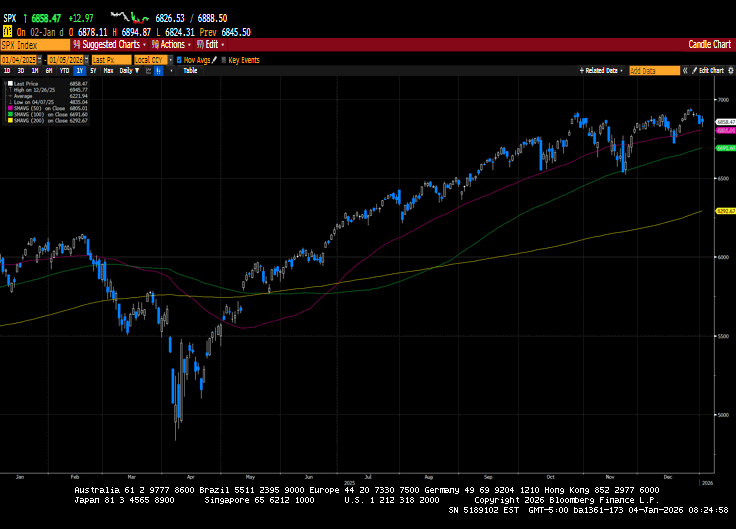
US markets ended the New Year holiday-shortened week with losses. Mega-cap Technology issues sold off on low volume, as did Financial and Consumer Discretionary sectors. That said, the S&P 500 posted its third straight year of double-digit gains as investors...
Medicare is not “set it and forget it.” Plans, provider networks, drug formularies, and costs can change each year—sometimes in ways that surprise people after they’ve already scheduled appointments or refilled prescriptions. A quick annual Medicare checkup can help...
As we move into 2026, many investors are asking the same question: How do I protect what I’ve built—without giving up the ability to grow? That’s exactly where annuities can play a meaningful role. Annuities aren’t for everyone, and they’re not “one-size-fits-all,”...
By Sarah Brenner, JD Director of Retirement Education ‘Tis the season for lists! Best TV shows, best of music and best podcasts. The lists go on and on. In the spirit of year-end lists, we present the “Best of the 2025 Slott Report.” Here are the retirement account...
By Andy Ives, CFP®, AIF® IRA Analyst The Grinch likes it when things go horribly wrong. He likes it when rambunctious pets tip over Christmas trees. He likes it when festive lights get terribly tangled, and he likes it when holiday cards are lost in the mail....
Note that the example above uses jQuery to trigger the function call, but you could trigger the function call using any method you wish.fbq('track', 'Lead'); - To track the lead event on the page. Like Thank you page after submitting the lead.
If you have the Thank you page after submitting the lead then you can paste this code on the page and it'll track it as a successful lead.
If instead you wanted to track a standard purchase event when the visitor clicks a purchase button, you could tie the fbq('track') function call to the lead button on your page, like this: